Skip to content
View in the app

A better way to browse. Learn more.

Asterios

A full-screen app on your home screen with push notifications, badges and more.

To install this app on iOS and iPadOS
  1. Tap the Share icon in Safari
  2. Scroll the menu and tap Add to Home Screen.
  3. Tap Add in the top-right corner.
To install this app on Android
  1. Tap the 3-dot menu (⋮) in the top-right corner of the browser.
  2. Tap Add to Home screen or Install app.
  3. Confirm by tapping Install.

Sergey1307

Users
  • Joined

  1. Похожая проблема, только с другой ошибкой. После перезагрузки ПК при входе в апдейтер появляется вот такая ошибка, впн включен.. все работает кроме апдейтера. В чем может быть дело?
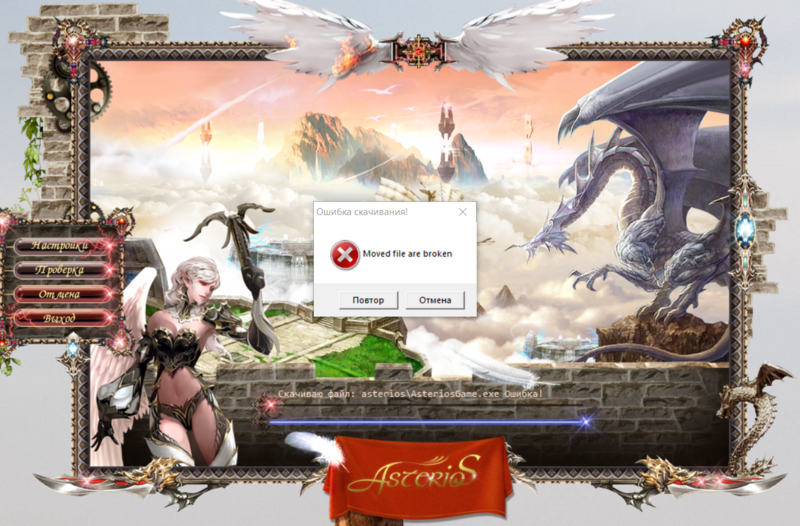
  2. Поддерживаю, проблема есть..в игру заходит, пару секунд стоит и выдает ошибку. Ждём какого-то ответа видимо официального.
  3. Вернулся из мини отпуска! АП! 😎
  4. АП! Всех с наступающим 2020 годом!! 😎😎😎
  5. БД есть оконный, СВС пока что только в мечтах Ап!)
  6. merry Christmas!!! 😍

Account

Navigation

Search

Search

Configure browser push notifications

Chrome (Android)
  1. Tap the lock icon next to the address bar.
  2. Tap Permissions → Notifications.
  3. Adjust your preference.
Chrome (Desktop)
  1. Click the padlock icon in the address bar.
  2. Select Site settings.
  3. Find Notifications and adjust your preference.